Conversion16 min read3,756 words
Event Inquiry Forms That Qualify: Date and Event Type First
How to build an event inquiry form that filters out work you cannot take, stays easy to finish on a phone at a venue, and routes cleanly into your follow-up.
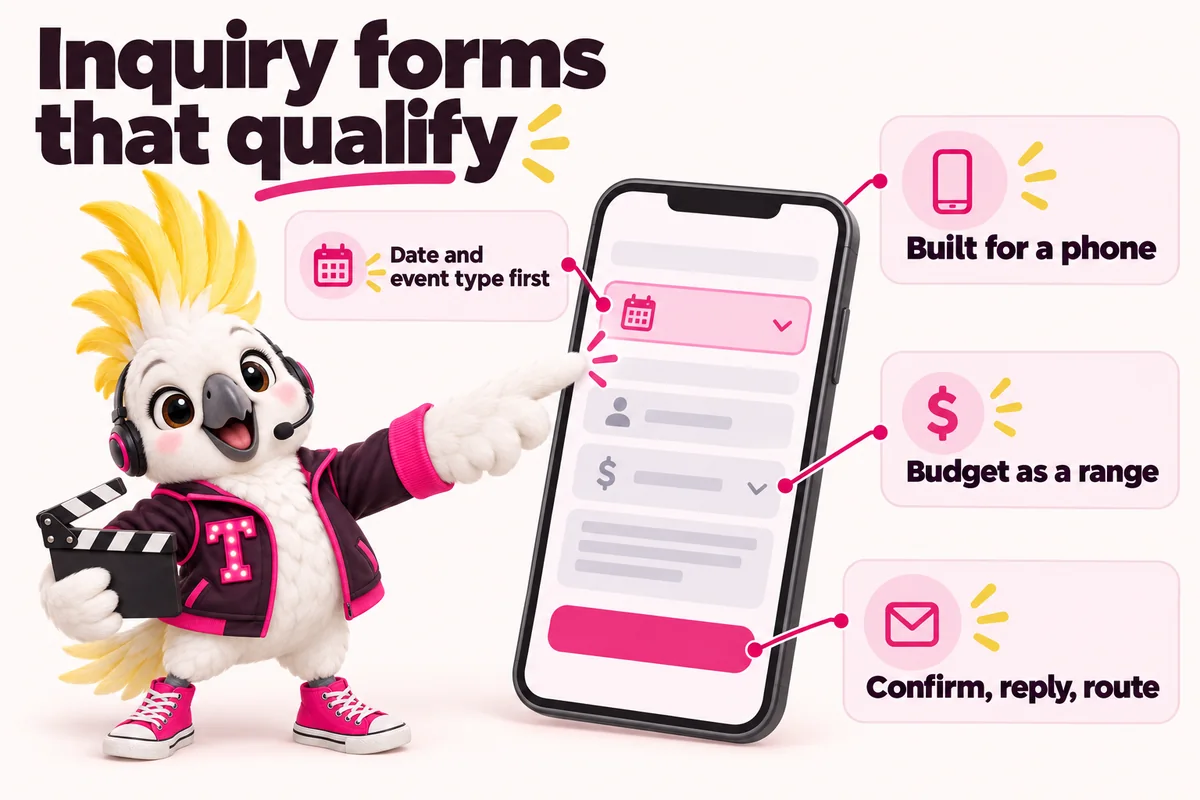
An event inquiry form has a different job from a normal contact form. A contact form wants to start a conversation. An inquiry form has to decide, in under a minute, whether a conversation is worth having at all, because availability on a specific date is the one thing an event business cannot manufacture. If the form does not ask about the date until the end, you will fill your week with calls about dates you were never free for.
The two answers that decide almost everything are the event date and the event type. The date tells you whether the job is possible. The type tells you whether it is yours, what you charge, and who on your team should reply. Everything else, including the sender’s name, is secondary to those two, and a form that opens with “First name” is asking the visitor to invest effort before either side knows the job exists.
This is a practical build guide: what to ask, in what order, how to handle budget without frightening people off, how to make it survive a one-handed attempt on a phone in a venue basement, and what has to happen after the submit button. It pairs with the run of show method for event company websites, which covers the pages that feed this form.
Why date and event type come first
Date and event type come first because they are the only two answers that can end the conversation before it starts. Every other field refines a job you might take. These two decide whether the job exists for you at all, so putting them at the top is both a qualification tool and a courtesy: if you are booked on their date, the visitor finds out in one screen rather than after a week of email.
Availability is the first filter
Nothing in an event business survives a date conflict. A wedding planner who is already booked on a Saturday in September cannot take a second wedding that day, no matter how good the fit is, and a production company with its crew committed to a conference load-in cannot magic up a second crew. When the date is the first field, it does three things at once: it filters, it sets the urgency of your reply, and it lets you show a genuinely useful message for dates you cannot serve, such as a referral to a trusted planner or an offer of a different date.
The date field should also accept uncertainty, because plenty of good inquiries have not fixed a date yet. Offer a date picker with an adjacent option for “date not fixed yet”, and where the event spans days, ask for a start and end. A festival producer or a multi-day conference producer needs both. Forcing a single exact date on someone planning a three-day programme makes them either guess or leave.
Event type decides the path
The second field should be the event type, because that single choice determines every question after it. A wedding needs to know the planning level and the venue status. A corporate conference needs the format, the attendee count and the procurement timeline. A nonprofit gala needs whether there is an auction, a programme and a sponsorship component. Asking event type second lets the form become the right form.
It also does the routing work. In a company with more than one division, the event type is what sends the inquiry to the right inbox, the right owner and the right follow-up sequence. A corporate and conference producer inside a full-service company should never find out about a corporate RFP because someone on the wedding team forwarded it three days later.
What never goes first
Name and email should not open the form. They ask for personal information before the visitor has any evidence the exchange will be useful, and they are the fields most likely to make someone decide to “come back later”. Put contact details at the end, once the visitor has already invested a few answers and has a reason to finish. The same goes for a long open-text box; asking someone to compose a paragraph as their first action is the surest way to lose them on a phone.
Field order that matches the decision
Order the fields the way you would actually triage the job: possible, then mine, then scoped, then who to call. Here is a field order that works for most event businesses, and which you can adapt without breaking the logic.
- Event date, with an option for a date range or “not yet fixed”.
- Event type, as a small set of clear choices rather than a long list.
- Guest or attendee count, as ranges.
- Venue status, because booked, shortlisted and no idea are three different jobs.
- Budget range, with context.
- Location or city, if you serve more than one market.
- Anything else you want us to know, optional and clearly marked as such.
- Name, email and phone, last.
Group it into screens, not one long scroll
Two or three short groups beat one long column on a phone. Keep the first group to date and event type so the visitor gets an early sense of progress, put the qualifying questions in the second, and the contact details in the third. If you use a multi-step form, show real progress and never reset answers when someone taps back. A visitor who loses their typing because the back gesture cleared the form does not start again.
Keep every field load-bearing
Before a field ships, ask what you would do differently based on the answer. If the answer is nothing, cut it. “How did you hear about us” is the usual offender: useful to you, irrelevant to the sender, and best placed at the very end as an optional field or asked on the call instead. Every field you cut that does not change your next action makes the form faster without making it less useful.
Asking about budget without scaring people off
Ask about budget, but ask it as a range, after the qualifying questions, with one line explaining why. A budget field costs you some inquiries. It saves you far more hours, and the inquiries it costs you are overwhelmingly the ones that would have ended on the discovery call anyway.
Ranges, not a blank box
An empty budget box is an exam question. Most people do not know what an event of their size should cost, they are afraid of naming a number that is embarrassingly low, and they are equally afraid of naming one that invites you to spend all of it. A short set of ranges removes all three problems at once, and it gives you a usable signal. Make the ranges reflect your actual tiers, start the lowest band at or near your genuine minimum, and include a final “not sure yet” option so the uncertain are not pushed into a guess or out of the form.
Language that lowers the stakes
The wording around the field does most of the work. A line such as “This helps us suggest a realistic scope. We work across a range, and the number is not binding” changes the question from a test into a piece of shared planning. Avoid the two extremes: no explanation at all, which reads as a gate, and an apologetic paragraph, which signals you are uncomfortable talking about money and invites negotiation before you have quoted anything.
When to soften it, and when not to
For a nonprofit gala and fundraising planner, budget is often set by a committee and genuinely unknown at inquiry time, so the useful question is the fundraising target or last year’s event size instead. For a corporate producer responding to an RFP, the budget may be fixed and disclosable, so a straightforward range is easy for the buyer to answer. For a wedding planner, the budget question is most sensitive and most necessary, and the best version usually asks for the overall event budget rather than the planning fee, with a note explaining the difference.
Guest count, venue status and the rest of the qualifying set
Guest count and venue status are the two fields that turn a vague inquiry into a scoped one, and together with date and event type they are usually enough to quote a range confidently.
Guest count should be asked in bands rather than an exact figure, because almost nobody knows the exact number early and a text field invites answers such as “about a hundred, maybe a few more”. Bands that match how your pricing actually changes are more useful than round numbers for their own sake, and they keep the input to a single tap.
Venue status is the field most event forms forget, and it changes the work more than almost anything else. A client with a signed venue contract has a fixed date, a floor plan, a preferred vendor list and a food and beverage minimum already in play. A client shortlisting venues needs site visits, comparison work and a walkthrough before anything else can be planned. A client with no venue at all is asking for a different service, earlier in the process, at a different fee. Three options and an “other” covers it: venue booked, venue shortlisted, help needed finding one.
Two more fields earn their place for specific businesses. Location or city matters the moment you serve more than one market, because travel changes cost and availability. Date flexibility matters for anyone who runs into weekend saturation: a couple who can move a date by a week is bookable when a couple who cannot is not.
Conditional paths for different event types
Show only the fields that belong to the event type the visitor selected, and hide the rest entirely rather than greying them out. Conditional logic is what lets one form serve several buyer types while every individual visitor still sees a short form.
Weddings and social events
After a wedding selection, ask for the planning level (full planning, partial planning or day-of coordination), the venue status, whether there are related events such as a rehearsal dinner or a welcome party, and the overall budget range. For a wedding planner or coordinator, the planning level question is also an education tool, because many couples do not know the difference, and a one-line description under each option quietly qualifies them while they choose.
Corporate and conference
After a corporate selection, ask for the event format (conference, internal meeting, incentive programme, product launch, hybrid or broadcast), the attendee count band, whether there is an existing venue or room block, the AV and production requirements at a high level, and the decision or procurement timeline. Add an optional file upload so a buyer can attach an RFP or a brief rather than retyping it. Ask for the company name here too, since it is a qualifying detail rather than a personal one.
Festivals, experiential and galas
After a festival or experiential selection, the first question is who is asking: a brand commissioning an activation, a sponsor, an artist or agent, or a press contact. Those go to entirely different places. For galas and fundraisers, ask about the fundraising target, whether there is a live or silent auction, whether a programme with speakers or honourees is planned, and whether sponsorship and table sales need to be managed. The gala calendar is unforgiving, so a date and venue status pair is doing heavy lifting there too.
Building it for a phone at a venue walkthrough
Assume the form will be completed one-handed, on a phone, on patchy venue signal, by someone standing up. That assumption drives most of the technical choices, and it is not pessimistic: event buyers genuinely do fill in inquiry forms in car parks, in hotel lobbies and between site visits.
Input types and keyboards
Use the input type that matches the data so the device shows the right keyboard. MDN’s reference for the input element documents the available types, including date, email, tel, number and url, along with the attributes that control them (MDN Web Docs, The input element). A telephone field that opens a numeric keypad, an email field that offers an at sign, and a date field that opens the native date picker each remove a small piece of friction, and on a small screen those add up. Where a numeric answer is not strictly a number, such as a postcode, the inputmode attribute lets you pick the keyboard without changing validation behaviour.
Autocomplete that fills the boring fields
Name, email, phone and company should all carry the appropriate autocomplete values so a phone can fill them from saved contact details in one tap. MDN documents the recognised token values, including name, email, tel and organization (MDN Web Docs, The HTML autocomplete attribute). This is the cheapest conversion improvement available on any inquiry form: it removes the exact fields people find most tedious, and it is a few attributes of work.
Touch targets, spacing and saved state
Make every tappable element comfortably large and well separated, because a mis-tap on a radio button is often where a visitor gives up. Keep the submit button visible without hunting for it, avoid input masks that fight what the user types, and preserve answers if the page reloads or the connection drops mid-submit. Losing a completed form to a dropped signal in a venue basement is the single most avoidable way to lose a booking. Our features page covers how we handle form state and delivery on managed sites.
Labels, errors and accessibility
Every control needs a visible label that stays visible, and every error must explain what to fix in words. Accessibility here is not a separate compliance exercise; the same choices that make a form usable with a screen reader are the ones that make it survivable on a phone in bad light.
Labels that do not disappear
Use a real label element associated with each control, positioned so it stays on screen while the field is being filled. The W3C Web Accessibility Initiative’s guidance on labeling controls is explicit that every input needs a programmatically associated label, and that placeholder text is not a substitute (W3C WAI, Labeling Controls). Placeholder-only forms fail the moment someone starts typing and the hint vanishes, which is exactly when a visitor is most likely to lose track of what a field wanted. Add short hint text under a field where the expectation is not obvious, such as what the budget figure should cover.
Errors that say what to do
An error message should name the field, say what is wrong and say what will fix it. The WAI tutorial on user notifications covers presenting errors so they are perceivable to everyone, including identifying them in text rather than by colour alone (W3C WAI, User Notifications). Colour-only error states are invisible to a portion of your visitors and easy to miss in sunlight. Put the message next to the field it belongs to, move focus to the first error, and never clear the rest of the form when validation fails.
Required fields, validation timing and contrast
Mark required fields in text rather than relying on an asterisk alone, and keep the required set genuinely minimal. Validate when a field is left rather than on every keystroke, so a half-typed email address is not flagged as wrong while it is still being typed. The Web Content Accessibility Guidelines set the underlying requirements for text contrast, keyboard operability and error identification that this all sits on (W3C, WCAG 2.1), and the WAI forms tutorial is the practical companion for building to them (W3C WAI, Forms Tutorial).
After the submit: confirmation, auto-reply and routing
What happens after the submit button decides whether a qualified inquiry becomes a booked event. A form that captures perfectly and then drops the lead into an unwatched inbox has achieved nothing.
The confirmation page
Send people to a real confirmation page rather than swapping the form for a line of green text. A dedicated page can tell the sender exactly what happens next, when they will hear back, who will be replying and what to do if the date is urgent. It gives you a clean conversion event to measure, and it gives you somewhere useful to point them next: a process page, the relevant portfolio category, or a frequently asked questions page that answers what they would otherwise email to ask while they wait.
The auto-reply
The auto-reply should confirm the details you received, restate the response window, name the person who will reply, and stop there. Echoing the date, event type and venue status back is worth more than any amount of warm copy, because it lets the sender spot a mistake immediately and reassures them that a human system received it. Send it from a monitored address, not a no-reply one; people answer these, and the answers are often the detail that wins the job.
Routing and follow-up cadence
Route on event type and date, in that order, and make the ownership explicit. Every inquiry should have a named owner the moment it arrives, not the first person who happens to see it. Practically, that means the submission goes into the system your team actually works from, with the event type setting the owner and the follow-up sequence, and the date setting priority, because an inquiry for a date eight weeks away outranks one for next year.
Then commit to a cadence and write it down: an initial reply within your stated window, a second touch a few days later if there is no response, and a final one after that before the inquiry moves to a nurture list rather than being silently dropped. Most lost event bookings are not lost on price. They are lost because a competitor replied first and followed up twice. A purpose-built inquiry and booking website should deliver submissions to that system reliably, with a client portal from launch day so nothing lives only in one person’s inbox.
How to test the form before you trust it
Test the form as a stranger would, on a real phone, before you rely on it. Most broken inquiry forms are not broken in an obvious way; they are quietly losing a share of submissions to a validation rule, a spam filter or a notification that goes to an address nobody reads.
Fill it in yourself, badly, on a phone
Complete the form on a real device on mobile data, not a desktop browser resized narrow. Then do it again deliberately wrong: submit with a field empty, type a malformed email address, pick a date in the past, tap back mid-way, and rotate the screen with the form half-filled. Anything that loses the visitor’s answers or produces an error you cannot understand at a glance is a defect. Check that the notification actually arrives, that it is not in spam, and that the auto-reply renders properly in a phone mail client.
Watch someone else do it
Ask two people who do not work with you, ideally people who resemble your buyers, to complete the form while you watch without helping. The hesitations tell you more than any survey: where they pause, which wording they reread, which question they ask you out loud. A budget field that needs explaining out loud needs explaining on the page.
Measure it, then change one thing at a time
Track how many people reach the form, how many start it and how many submit, and record the completion event on the confirmation page. When you change something, change one field or one piece of wording at a time, and give it enough inquiries to mean anything before judging it. Review submission quality monthly alongside the count, because a form that produces fewer, better-qualified inquiries is doing its job even when the raw number falls.
What to do next week
Open your own inquiry form on your phone and complete it as a stranger would. Time it. Note the field order, whether the date appears before your name, whether the budget question is answerable, and whether the confirmation tells you anything useful. That single exercise usually produces the whole list of fixes.
Then work through it in this order:
- Move event date and event type to the top, and add a “date not fixed yet” option.
- Cut every field that does not change your next action, and move the rest of the questions to the discovery call.
- Replace the open budget box with ranges that match your real tiers, plus one line of context.
- Add venue status and guest count bands if they are missing.
- Fix the labels and the error messages, using the WAI forms tutorial as the checklist.
- Build a real confirmation page and rewrite the auto-reply to echo back what was submitted.
- Name an owner and a follow-up cadence for every event type, and write both down where the team can see them.
If you would rather have this built and maintained for you, you can book a live demo and see a qualifying form put together around your own event types, routing and response times.
Sources
Frequently asked questions
Will asking for a budget range make people abandon the form?
Some will leave, and most of those were never going to book you. The people who abandon at a budget field are usually the ones who would have discovered the mismatch on a discovery call instead, after an hour of everyone's time. Offering ranges rather than a blank box, placing the field after date and event type, and adding a short line explaining why you ask all reduce the drop without hiding the question.
How many fields is too many for an event inquiry form?
The count matters less than whether every field changes what you do next. If an answer will not affect whether you can take the job, what you quote, or who replies, it belongs on the discovery call rather than the form. A wedding coordinator can qualify on five or six answers. A corporate producer responding to an RFP may legitimately need more, because procurement needs structured information up front.
Should each event type have its own form, or one form with conditional fields?
Either works, and the choice is usually about maintenance rather than conversion. One form with conditional paths keeps the logic and the routing in a single place, which is easier to change later. Separate forms on separate event type pages let you prefill the event type and write the surrounding copy for one buyer. What matters is that nobody is shown fields for an event type they are not planning.
What response time should the auto-reply promise?
Promise the time you can actually hit on your worst week, not your best one. An auto-reply that commits to same-day contact and then arrives four days later during load-in week does more damage than one promising two working days and beating it. State the window, say who will reply, and tell the sender what to do if their date is urgent so they are not left guessing.
How do I know whether the form itself is the problem?
Compare the number of people who reach the form with the number who submit it, then watch where the ones who leave stop. If submissions fall off at a specific field, that field is doing the damage. If people reach the page and never start, the surrounding page is the problem rather than the form. Testing on a real phone, on mobile data, usually surfaces the issue faster than any analytics view.