Technical14 min read3,198 words
Structured Data for Event Companies: What to Mark Up, What to Skip
A plain-language guide to JSON-LD for an event business website: the types that genuinely apply, the ones to leave alone, and how to validate what you publish.
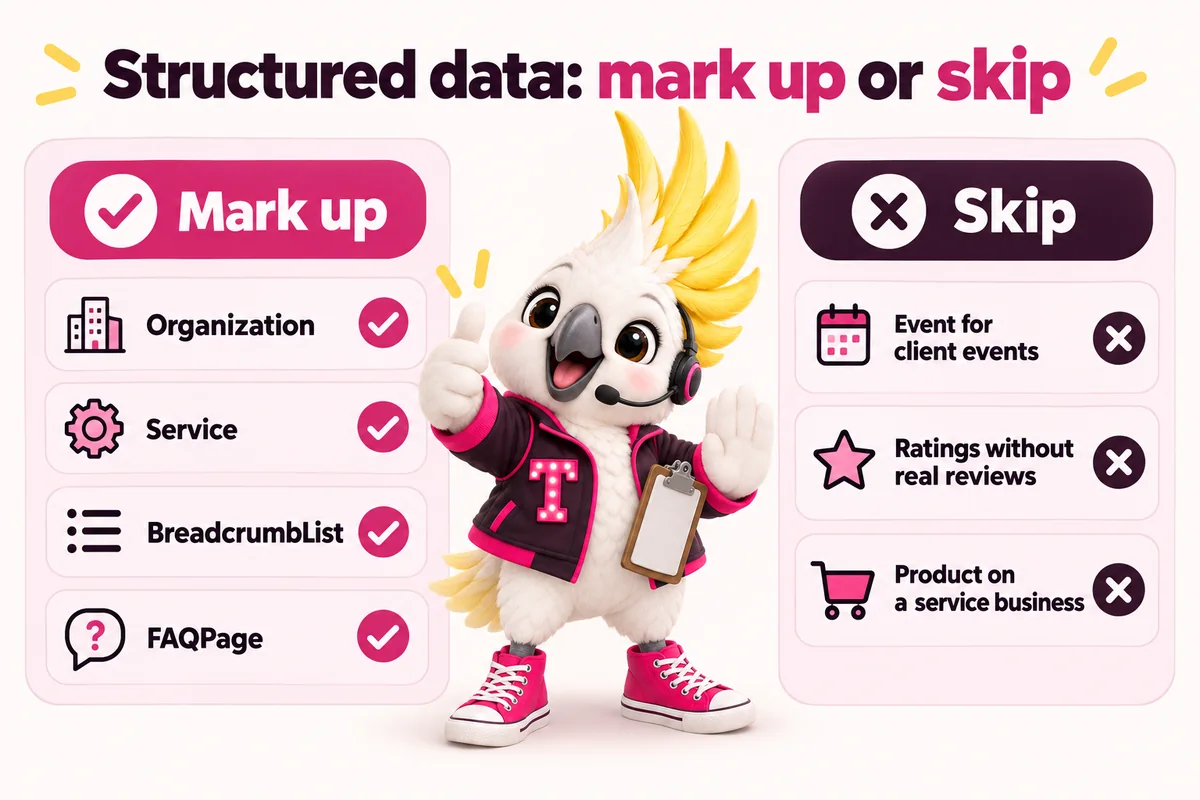
Structured data is a label, not a lever. It is a small block of machine-readable code, usually JSON-LD in the head of the page, that tells a search engine what kind of thing the page describes: this is an organization, this is a service, this is a list of questions and answers. Google’s own introduction to structured data describes it as a standardized format for providing information about a page and classifying its content, and it is explicit that using markup enables features but does not guarantee any of them appear (Google Search Central, Intro to how structured data markup works).
That distinction matters for event companies specifically, because the industry has been sold a lot of markup it does not need. Plenty of event websites carry AggregateRating with no collected reviews, Product markup on a planning service, VideoObject on pages with no video, and Event markup on portfolio pieces about weddings that happened two years ago. None of that helps, and some of it breaches published policy.
This guide covers what actually applies to an event planning, production or management business, what to leave off, why marking up invisible content is a policy problem rather than a clever shortcut, and how to check your work before it ships.
What structured data actually does
Structured data classifies the content already on your page so that machines do not have to infer it from prose. A search engine reading your corporate events page can guess from the words that you provide event production services in a region, but a Service block states it: this is the service, this is who provides it, this is the area served. Google’s documentation frames markup as helping search engines understand the page and making it eligible for richer presentation in results (Google Search Central, Intro to how structured data markup works).
It describes, it does not promote
The most useful mental model is a shipping label. A label makes a parcel easier to route correctly. It does not make the parcel more valuable, and a label that misdescribes the contents causes a problem rather than solving one. Markup works the same way. A thin page with perfect JSON-LD is still a thin page, and a strong page with no markup can still rank well.
This is worth saying plainly because the opposite is a common sales pitch. Nobody can add markup to a site and produce rankings, and any proposal that implies otherwise is describing something other than what the documentation says structured data does.
No markup guarantees a search feature
Google states directly that using structured data enables a feature to be present, not that it will be. Eligibility is not entitlement. Result features change, they are applied selectively, and a page can be perfectly marked up and still show as an ordinary blue link. Plan on that basis. The reason to add markup is that it is a cheap, accurate way to describe your pages, and if a richer result follows, that is an upside rather than the business case.
The types that genuinely apply to an event company
Most event businesses need a handful of types and no more. Each of the following describes something that genuinely exists on a real event company website, which is the only test that matters.
Organization or LocalBusiness, once, sitewide
Pick one and use it consistently. Organization describes the company as an entity: legal name, logo, website, social profiles, contact points. LocalBusiness is a more specific subtype that adds the properties a place-based business needs, such as address, telephone, opening hours and area served. An event company with a studio or office that clients visit is usually a LocalBusiness. A planner working from home who travels to clients may prefer Organization plus explicit service-area information, which sits more comfortably with how the business actually operates.
Whichever you choose, it belongs in one place, rendered on every page, describing the company rather than the page. The mistake to avoid is pasting an Organization block onto pages that describe something else entirely, so that a service page, a blog post and the contact page all announce themselves as the same organization and nothing more specific.
Service on each event-type page
Service is the type that most event companies under-use and that fits them best. Schema.org defines Service as a provided service, with properties for the provider, the type of service, the area served and the audience (Schema.org, Service). That maps cleanly onto how an event business is actually structured: wedding planning, corporate event production, festival production, gala management and day-of coordination are services, each with a provider, a region and a buyer.
A minimal block on a corporate event production page looks like this:
{
  "@context": "https://schema.org",
  "@type": "Service",
  "serviceType": "Corporate event and conference production",
  "provider": { "@type": "Organization", "name": "Your Company Name" },
  "areaServed": { "@type": "City", "name": "Your City" },
  "audience": { "@type": "Audience", "audienceType": "Corporate event organisers" }
}
Keep the serviceType wording identical to the heading a visitor reads on the page. If the page says corporate event and conference production, the markup should not say event planning services, because the two are describing the same thing differently and the whole point of the label is accuracy.
BreadcrumbList on every page below the home page
BreadcrumbList tells a search engine where a page sits in the structure of the site, which is exactly the information a multi-section event company website has and most sites fail to state. A festival production page inside a services section inside the site is a three-step path, and marking it up costs nothing.
This matters more for event companies than for single-service businesses because the sites are naturally deep. Event-type pages, market pages, portfolio categories and a blog all nest. A site built with the structure described in the run of show method for event company websites will have a clear hierarchy already; breadcrumbs simply publish it.
FAQPage where visible questions and answers exist
FAQPage applies to a page that displays a list of questions with their answers, and only to such a page. This is genuinely useful for event businesses, because the questions buyers ask are predictable and answering them on the page is good practice regardless of markup. What does day-of coordination include. How far in advance should we book. Do you handle the F&B minimum negotiation. Do you travel.
The rule attached to it is absolute and covered in detail further down: the questions and answers in the markup must be the questions and answers on the page, word for word. Our own frequently asked questions page works this way, with the markup generated from the same content the reader sees.
Article, BlogPosting and ImageObject
Article and BlogPosting describe editorial content, and ImageObject describes the images inside it. If you publish case studies, venue guides or planning advice, these are the types that apply, and they are straightforward because they describe exactly what the page is.
Which one to use
BlogPosting is a subtype of Article intended for blog posts, and Article is the broader type. For a blog on an event company site, BlogPosting is the closer fit. The properties worth filling in honestly are the headline, the publication date, the modified date if you genuinely update posts, the author as a real named person rather than a company or a generic editorial team, and the primary image.
The author property is where event companies most often get sloppy. If the piece was written by your creative director, name her. An author credit that points at the company itself carries less information than one that points at a person with a real biography, and the biography is what a reader checking your credibility is looking for anyway.
ImageObject and the photographs you already have
ImageObject describes an image as a thing in its own right, with properties for the URL, caption, dimensions and, where you have it, the creator and licence. Event companies are unusually image-rich businesses, and this is one of the few places where the markup has a direct practical benefit: photographer credit and licence information travel with the image rather than living only in a contract.
If your agreements with event photographers specify credit, ImageObject is a reasonable place to express it alongside a visible on-page credit. It does not replace the visible credit, and it does not grant you rights you do not have.
The Event type: only for events you actually sell
Use Event markup for events people can attend, not for events you produced for a client. Google’s Event documentation is written around events with a name, a start date, a location and, where applicable, ticket offers, so that the event can be surfaced to someone looking for something to attend (Google Search Central, Event structured data). The type exists to serve an attendee.
When it genuinely applies
Event markup is correct when your business sells access to an event on its own site. That covers a fair number of real cases:
- A festival or experiential producer running its own ticketed event, with dates, a venue and ticket tiers on the page. This is the clearest use, and festival and experiential producers often run several such pages at once.
- A nonprofit gala with a public ticket or table page, where individual tickets and table sponsorships are both being sold. Teams working on nonprofit gala and fundraising sites generally need this alongside a permanent donate page.
- A conference or summit you own rather than produce for a client, with a published programme and registration.
- A workshop, open house or showcase you are hosting and inviting people to attend.
In each of those, the page really is about an upcoming event, the date and location are visible on the page, and a reader can act on it. Fill in the location properly, use the correct event attendance mode if the event is online or hybrid, and keep the offers section accurate about what is actually on sale.
When it does not apply
Event markup is wrong on a portfolio page, and this is the single most common misuse in the industry. A case study titled after a product launch you produced in another city last year is an article about your work. The reader cannot attend it, there are no tickets, and the date has passed. Marking it as an Event tells a search engine something untrue about the page, which is precisely what the structured data guidelines prohibit: markup must describe the content that is actually there (Google Search Central, Structured data general guidelines).
The correct markup for a portfolio piece is Article or BlogPosting, with the images described as ImageObject and the service it demonstrates linked back to the relevant event-type page. That is accurate, it is useful, and it does not put the site at risk.
The types event companies wrongly bolt on
Three types turn up repeatedly on event websites where they do not belong, usually installed by a plugin or copied from a competitor. Each one is worth removing.
Review and AggregateRating without collected reviews
This is the big one. Review and AggregateRating describe reviews that exist and are shown on the page. Google’s review snippet documentation sets out requirements for them, including that the reviewed content be visible on the page and that ratings not be self-serving, meaning a business should not be marking up reviews of itself that it wrote or that appear nowhere a visitor can read them (Google Search Central, Review snippet structured data).
Event companies fall into this constantly, and usually innocently. A planner has genuinely happy clients, a theme option offers a star rating field, and a rating appears in the markup that corresponds to nothing. The fix is straightforward: publish real testimonials with real attribution on the page, and if you want structured review data, collect it through a system that produces reviews you can actually show. Absent that, delete the markup and keep the testimonials.
Product on a service business
Product describes a product offered for sale, with the properties a product has. A wedding planning package is a service, not a product, and Service is the type built for it. The temptation comes from result features that appear for products, but marking a planning package as a Product misdescribes the page, and misdescription is the thing the guidelines forbid.
The genuine exception is narrow. If you actually sell goods through your site, such as merchandise for a festival you own, Product is correct on those pages and nowhere else. Planning retainers, production day rates and coordination packages are services.
VideoObject with no video
VideoObject describes a video that is on the page and playable. If there is no video, there should be no VideoObject, and if there is a video, the markup needs the properties the video actually has, including a thumbnail and an upload date. Sizzle reels and recap films are common in this industry and genuinely worth marking up when they exist and are embedded on the page. A VideoObject block that a plugin added to every page regardless of content is noise at best.
Why invisible markup is a policy problem
Marking up content a visitor cannot see is not a grey area. Google’s structured data general guidelines state that the marked-up content must be visible to users viewing the page and must represent the page accurately, and its spam policies describe misleading structured data, including markup about content that is invisible to users or inaccurate, as a violation that can affect how a site appears in search (Google Search Central, Structured data general guidelines; Google Search Central, Spam policies for Google web search).
The FAQPage trap
FAQPage is where this goes wrong most often, because it is so easy to write questions into a markup field and never put them on the page. A content plugin offers an FAQ schema box, someone types five questions into it, and the page itself shows none of them. The result is markup describing content that does not exist.
The fix is a workflow rather than a rule. Write the questions and answers into the page, visible, where a reader benefits from them. Then generate the markup from that same content so the two cannot drift apart. On a well-built site this is automatic: the markup is produced from the page data, so editing an answer updates both at once and there is nothing to keep in sync by hand.
Two related traps
- Stale event data. An Event block left in place after the event has passed, or ticket offers marked as available after they sold out, describes something untrue. If you run ticketed events, retiring or updating the markup belongs in your post-event checklist next to closing the box office.
- Copied blocks. JSON-LD copied from one event-type page to another and not fully edited is a quiet, common source of inaccuracy. The tell is a serviceType or areaServed that belongs to a different page.
How to validate what you publish
Validate every template once, then spot-check after content changes. Two tools cover it. The Rich Results Test checks whether a page is eligible for Google result features and reports errors and warnings against the specific requirements. The Schema Markup Validator, hosted by Schema.org, checks your markup against the vocabulary itself rather than against one search engine’s feature requirements, which is useful for types with no associated result feature.
Search Console adds the ongoing layer. Its enhancement reports list the structured data types it has detected across the site along with errors and warnings, which is how you catch a template change that broke markup on a few hundred pages rather than one.
A pre-publish checklist
Run this before any new page type goes live:
- Open the rendered page and read it. Every fact in the markup should be findable on the page by a human being.
- Check the type against the page’s actual purpose. Service on a service page, Article on a case study, Event only on an event people can attend.
- Run the Rich Results Test and clear the errors. Read the warnings and fix the ones that represent genuinely missing information.
- Check one page of every template, not one page of the site. Templates are where breakage lives.
- Re-check after any content model change, particularly if FAQ or testimonial content moved.
If you would rather this were simply handled, it is part of how we build. Our features page covers what is included at each tier, and the SEO for event planners work applies the correct type to each page as standard rather than as an add-on.
What to do next week
Spend one afternoon auditing what your site currently claims, and remove more than you add. In order:
- Inventory. Open Search Console and list every structured data type it has detected on your site. Most owners are surprised by at least one entry.
- Delete the wrong ones. Any AggregateRating not backed by visible collected reviews, any Product on a service page, any VideoObject on a page without a video, and any Event on a portfolio piece. Removing these is the highest-value hour in the whole exercise.
- Fix the entity block. Decide between Organization and LocalBusiness, make it consistent sitewide, and check the name, address and phone match the rest of your site exactly.
- Add Service to your event-type pages, with serviceType wording that matches each page’s visible heading.
- Put breadcrumbs on everything below the home page.
- Make your FAQ content visible wherever markup currently claims questions the reader cannot see, then regenerate the markup from the visible text.
That sequence leaves you with a smaller, accurate set of markup that describes your site truthfully, which is the only version that holds up over time. If you would like the structure and the markup built together rather than retrofitted, you can book a live demo and see it applied to your own event types, or read how we approach event management website templates for companies that want the structure without a bespoke build.
Sources
- Google Search Central: Intro to how structured data markup works
- Google Search Central: Structured data general guidelines
- Google Search Central: Spam policies for Google web search
- Google Search Central: Event (Event) structured data
- Google Search Central: Review snippet (Review, AggregateRating) structured data
- Schema.org: Service
Frequently asked questions
Will adding structured data improve my rankings?
Not directly, and no honest answer promises otherwise. Google's structured data documentation describes markup as a way to help search engines understand a page and to make it eligible for certain result features, and it states that using it does not guarantee any of those features will appear. Treat markup as clear labelling of content that already deserves to rank, never as a substitute for the content itself.
Should I mark up past events from my portfolio with the Event type?
No. Google's Event structured data documentation is for events people can actually attend, with a date, a location and, where relevant, ticket information. A portfolio case study about a gala you produced last spring is an article about your work, not an upcoming event, and marking it as one misrepresents the page. Use Article or BlogPosting for the case study and keep Event for events you genuinely sell tickets to.
Can I add AggregateRating if clients say lovely things in emails?
No. Review and AggregateRating markup describes reviews that are collected and displayed on the page, and Google's review snippet documentation sets out requirements including that the reviewed content is visible to users and that ratings are not self-serving. Private praise in your inbox does not meet that bar. Publish real testimonials with attribution first, and only then consider whether markup is appropriate.
Does my FAQ markup have to match the text on the page exactly?
Yes. Google's structured data guidelines require that marked-up content is visible to the user viewing the page and that the markup represents that content accurately. If your FAQPage markup contains a question and answer nobody can read on the rendered page, the markup is misleading rather than merely unhelpful. Write the questions and answers into the page first, then generate the markup from the same source.
How much structured data is too much for a small event company site?
You need less than most plugins install. For a typical event business, one Organization or LocalBusiness block sitewide, Service on each event-type page, BreadcrumbList on every page below the home page, and FAQPage where visible questions exist covers almost everything useful. Adding types that do not describe the page is where sites get into trouble, not leaving optional ones out.